 Sign in
 Anonymous
on October 24th 2023
0
Anonymous
on October 24th 2023
0
64 x 64
This operation allows resizing of static or animated mouse cursors. If the cursor only has one size, the operation will create a new image(s) in the cursor with the applied size, thus making the cursor a multi-resolution cursor. While designing custom cursors or importing cursors from Linux format, it is sometimes beneficial to use larger than the standard size. This operation can be used before releasing the cursor to make its size standard.
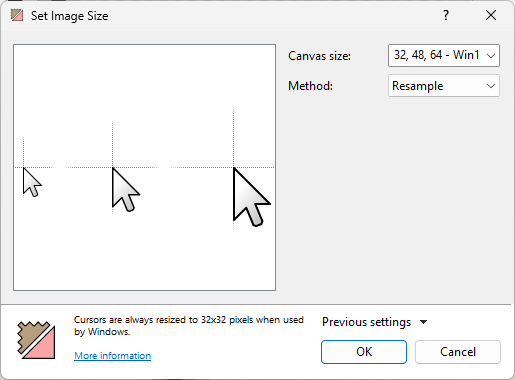
Canvas size determines the max canvas size of the cursor. The configuration has options for 32x32 (default windows cursor size), 48x48 (max size in Windows 7), and 64x64 (max size in Windows 11) pixel sizes. If you are choosing add a size larger than the ones that currently exist in the cursor, it will create a new image in the cursor based on the currently existing objects. If you are choosing a size that is smaller than the cursor's existing sizes, it will remove the sizes that are not within your selection from the cursor.
The configuration also allows you to enter your own sizes from 1 to 256. To create multiple custom sized images, put a comma before each number after the first one like this:
32, 48, 64, 128, 256If the cursor is using a single size other than the regular 32, 48, or 64 sizes, Windows will automatically resize the cursor to the default 32x32 size.
Method determines how the new images are going to be created based off the current image(s) and it's objects. Resample takes the existing objects and proportionally resizes them with the selected sizes. The hot spot will also be proportionally positioned in the created images. When working with raster layers, these layers in the new images can appear blurry. Vector layers however can keep it's resolution between images without any quality loss.
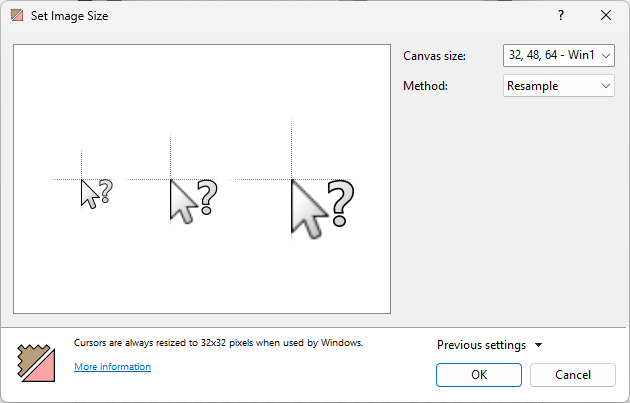
The operation is being used on a cursor with both a raster and a vector layer. The arrow shape (the raster layer) appears blurry in the larger images, while the question mark (the vector layer) does not.
Crop keeps the size and the position of the existing objects and hot spot between all the images.
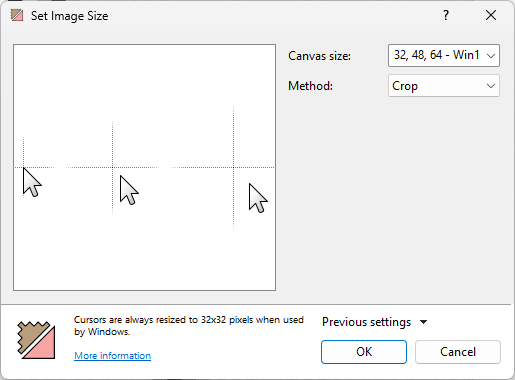
You may be able to notice that the cursor keeps the same position between all the images.
 Recent commentsAnonymous
on October 24th 2023
0
Recent commentsAnonymous
on October 24th 2023
0
64 x 64
Anonymous
on November 20th 2024
0
SOLUTION: TO CHANGE THE CURSOR SIZE, CREATE A NEW FILE AND ON THE RIGHT OF THE SCREEN THERE IS AN OPTION: "CANVAS SIZE". DOUBLE CLICK ON THE DROPDOWN MENU AND TYPE IN THE SIZE YOU WANT LIKE THIS: 64x64 FOR A CANVAS WITH 64 BY 64 PIXELS! 😁
How do I resize animated cursors without losing quality?
Eric F.
on December 6th 2025
0
Also, if you are a dev, do not use LoadCursor, instead use LoadImage to load your cursors. This way you can have cursors > 32x32.
moana
on February 3rd
0
😴
 rvsfzx
on February 8th
0
rvsfzx
on February 8th
0
golden dandelion
wgwg
on March 24th
0
wrgwgwr
Mijares
on March 28th
0
como ordenar el tamaño de vista previa del cursor, ya qur tiene diferentes tamaños el mismo cursor, tiene el tamaño 32x32, 64x64 y 128x128 y quiero que el orden sea primero 128x128 y los otro después de esos
dds
on March 29th
0
trfhwgeeeeee
Lithuania
Luxembourg
minni
yesterday
0
last comment lol
 reddit
 Facebook share