


user iconartificialangelcandy yesterday
15 views

topic icontopic icontopic iconRealWorld Cursor Editor not cooperating with drawing tablet

Operating System: Windows 11
Software used: RealWorld Cursor Editor 2023.1
Drawing Tablet used: Huion Kamvas Pro 16

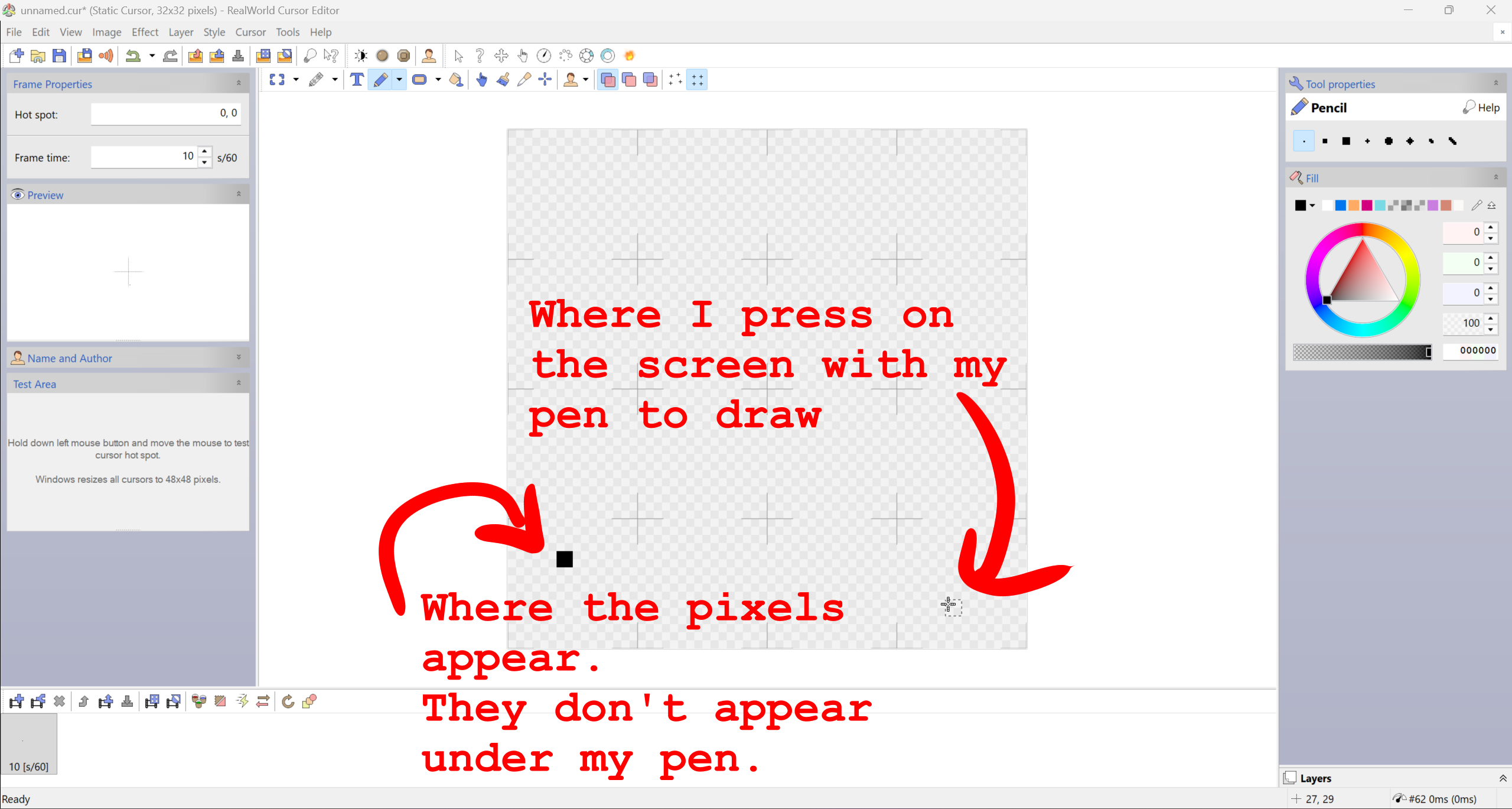
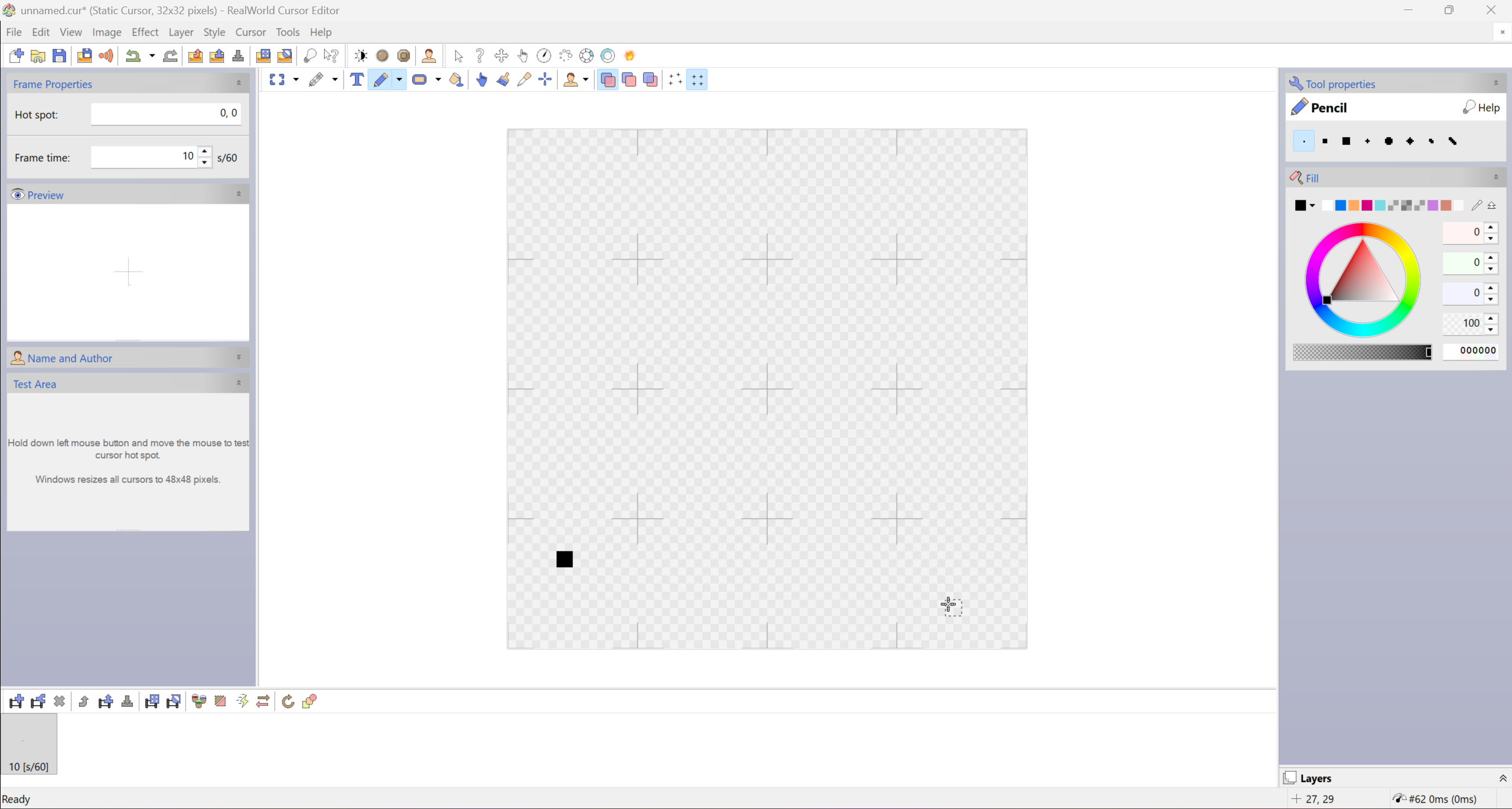
Hello! I cannot use my drawing tablet in RW Cursor Editor because where I press on my screen does not match up with where my brush ends up. The brush tool is significantly offset from my pen cursor. I'd like to use my tablet as I am better at making marks with a pen than my mouse, but I cannot use this program the way that it is now. I've tried both the downloader (.msi) and the portable versions, both had this issue. RW Cursor Editor is the only program I have this issue in, so I believe it is a software issue.

When I use my mouse, the cursor lines up and is not offset. So it's only my drawing tablet that has this issue.

I've taken a screenshot to show how offset the brush is from my cursor to show what I mean. One with notation (in red), one without the notation for visibility and clarity.
rsrc/rw cursor bug report.png imagersrc/rw cursor bug report no text.png image
I'm not sure what causes this so I have no idea how to fix it. Let me know if I need to clarify anything.

Also, let me know if I've misused the forum in any way (tags, posting, etc), as this is my first post.

Have a lovely day :3

user iconVlasta yesterday 0

Hi,

there is some direct support for tablets in RealWorld applications through IRealTimeStylus and WinTab (including pressure support only in the Brush tool (not Pencil tool)). These communicate with the application very differently than a normal mouse. It was only tested with few tablets as I cannot test with every device.

I do not know if you have tried other graphic software with direct table support (you could tell if it does if it has different reaction to a different pressure - for example more intense or wider line when pushing the pen more). It would be useful info if you have used some of that software without problems.

Anyway, I got some answers googling for "Huion Kamvas Pro 16 pen wrong place" including a video https://www.youtube.com/watch?v=AiELFtI-c_4 that has some advice - installing driver, changing working area, calibrating.
user iconartificialangelcandy about 14 hours ago 0

Hi, thanks for your quick response!

I've had this drawing tablet for a few years and I've used two drawing programs with it: FireAlpaca and Krita. I mainly use Krita nowadays, and pen pressure works properly the way you describe it in both Krita and FireAlpaca. Outside of drawing software, like on my desktop or moving files around, the pen cursor is not offset, too. It was only RW Cursor Editor that has this offset cursor behavior.

I'd be fine without pen pressure in RW Cursor Editor since the canvas' pixel size is so small. It's just the cursor offset that's bothering me. I just feel like I make better marks with a pen than my mouse, but if it comes down to it I'll learn how to use the mouse that way.

It looked like the person in the video you sent had a different issue than me, but I still tried out the steps they took just in case they would help anyway. I updated my driver and recalibrated the screen but the cursor is still offset in RW Cursor Editor (still fine in Krita, though, luckily). I didn't realize my driver was out of date, so I'm glad I checked that.

I'll look into IRealTimeStylus and WinTab and try those out! 😊

Update: I went into my program that came with my tablet driver and turned off "Enable Windows Ink" for the tablet's digital pen. It instantly fixed the cursor offset! So it must have been a Windows Ink issue. I thought that was a possibility as I was trying to troubleshoot with my limited knowledge, but I forgot where to find the Windows Ink settings.

user icon