 Sign in

RealWorld Cursors for Chrome and Firefox
Turn the default mouse cursor into yours on every website you visit.
RealWorld Cursors is a free Chrome/Firefox extension that replaces the browser's mouse cursors with any cursor you like: a classic arrow, a cartoon hand, a sparkling beam. It pairs with the RealWorld cursor library, where you can replace your cursor with a single click.
To Add RealWorld Cursors to Chrome, go to https://chrome.google.com/webstore/detail/c/clkjbhhgjchkhfabobknmhajgfjmhdcl
To Add RealWorld Cursors to Firefox, go to https://addons.mozilla.org/en-US/firefox/addon/realworld-cursors/
What it does
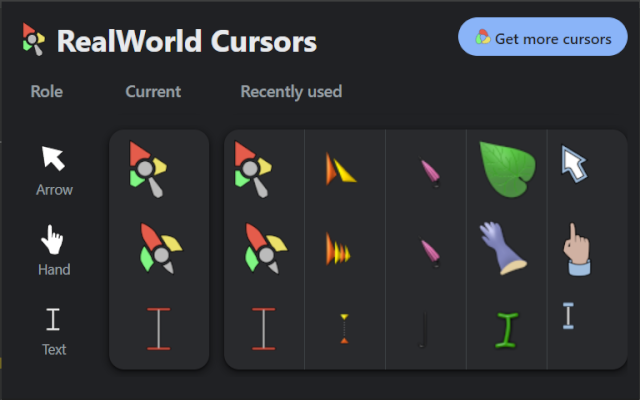
Chrome uses multiple cursors for different roles. This extension lets you control three of the most used ones and select each of them separately:
- Arrow cursor - the normal pointer over the page
- Hand cursor - the pointing hand over links and buttons
- Text cursor - the beam over selectable text and text fields
Replace one of them, or apply a complete cursor scheme that changes all three at once. Your choices apply instantly and work on every website in Chrome. Animated cursors are supported too.
How it works
- Every cursor you apply is stored locally in your browser and re-applied automatically, including after restarts - no need to re-apply anything.
- Getting a cursor takes one click: open a cursor's detail page in the cursor library, choose the role you want to change and apply it. The extension picks up the cursor stylesheet directly from the page, so there is no extra loading wait.
- Whole schemes are applied the same way from a cursor-set page.
- Recently used sets are kept in the toolbar popup, so switching back to a previous look is just one click. Any role can be reset to the browser default at any time.
How to use it
- Install the extension from the Chrome Web Store or AMO.
- Browse the cursor library and open the detail page of a cursor you like.
- Apply it - pick the role (Arrow, Hand or Text cursor) and use the button on the page. To change the whole look at once, open a cursor set and apply its scheme.
- Manage everything from the extension's toolbar icon: preview your current cursors, re-apply a recent set, reset a single role, or restore the browser defaults.
 Recent comments